

Mon Apr 13 2020
...
Setting up SSO With FastComments
Overview
What is SSO?
SSO, or single-sign-on, is a set of conventions that allows you or your users to use FastComments without having to create another account.
Assuming you don't allow anonymous commenting, an account is required to comment with FastComments. We simplify this sign-up process - the user only needs to provide their email when they comment. However, we understand that even that can be additional friction that some sites want to avoid.
How do I get it?
All account types currently have access to SSO as well as support. However, the maximum number of SSO users will vary depending on your package.
WordPress Users
If you're using our WordPress plugin, there’s no code to write! Just go to the plugin's Admin page, click SSO Settings, and then Enable.
This will guide you through a single-button click wizard that will create your API key, deliver it to your WordPress installation, and activate SSO. We've streamlined this into a single button click for your convenience.
Please note that if you are installing the plugin for the first time, you will need to complete the setup process before you can access the admin page with the SSO Settings button.
Custom Integrations
FastComments SSO utilizes HMAC-SHA256 encryption as the method to implement SSO. We will first discuss the overall architecture, provide examples, and detailed steps. However, at the end of this article, there are instructions for migrating from Disqus and Commento.
The flow looks like this:
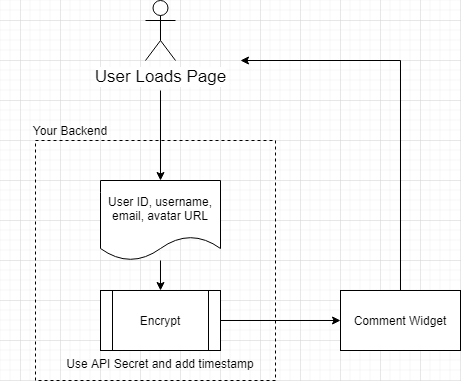
You do not need to write any new API endpoints with FastComments SSO. Simply encrypt the user's information using your secret key and pass the payload to the comment widget.
We provide fully functional code examples in several languages/run-times including NodeJS, Java/Spring, and vanilla PHP. Although we use ExpressJS in the NodeJS example and Spring in the Java example, no frameworks/libraries are required in these run-times to implement FastComments SSO - the native crypto packages will suffice.
You can find the code example repository here:
FastComments SSO Code Examples
Get Your API Secret Key
Your API Secret can be retrieved from this page. You can also find this page by going to My Account, clicking the API/SSO tile, and then clicking "Get API Secret Key".
Comment Widget Parameters
High-level API documentation for the comment widget can be found here and by clicking "Show Advanced Options". Search for SSO on the page.
Let’s go into more detail about what these parameters mean.
The comment widget takes a configuration object - you already provide this if you're using FastComments to pass your customer ID (referred to as tenantId).
To enable SSO, pass a new "sso" object, which must contain the following parameters. The values should be generated server side.
- userDataJSONBase64: The user's data in JSON format, which is then Base64 encoded.
- verificationHash: The HMAC-SHA256 hash created from UNIX_TIME + userDataJSONBase64.
- timestamp: The current UNIX time. Must not be in the future, or more than three hours in the past.
- loginURL: A URL that the comment widget can display to log the user in.
- logoutURL: A URL that the comment widget can display to log the user out.
- loginCallback: When provided instead of the login URL, a function that the comment widget will invoke when the login button is clicked.
- logoutCallback: When provided instead of the logout URL, a function that the comment widget will invoke when the logout button is clicked.
The User Object
The User object contains the following schema:
- id (string, required) (1k characters max)
- email (string, required) (1k characters max). Note: Must be unique.
- username (string, required) (1k characters max). Note: The username cannot be an email. Does not have to be unique.
- avatar (string, optional) (3k characters max)
- optedInNotifications (boolean, optional)
- displayLabel (string, optional, 100 characters max). This label will be shown next to their name.
- websiteUrl (string, optional, 2000 characters max). The user's name will link to this.
Notifications
To enable or disable notifications, set the value of optedInNotifications to true or false accordingly. The first time the user loads the page with this value in the SSO payload, their notification settings will be updated.
VIP Users & Special Labels
You can display a special label next to the user's name by using the optional "displayLabel" field.
Unauthenticated users
To represent an unauthenticated user, simply do not populate userDataJSONBase64, verificationHash, or timestamp. Provide a loginURL.
Direct Examples for Serializing and Hashing User Data
More details and examples can be found here (js), here (java) and here (php).
Migrating from Disqus SSO
The main differences between Disqus and FastComments SSO are that Disqus uses SHA1 for encryption while we use SHA256. This makes migrating from Disqus straightforward - simply change the hashing algorithm from SHA1 to SHA256 and update the property names sent to the UI.
Migrating from Commento SSO
Commento employs a significantly different SSO method - they require you to have an endpoint that they invoke to authenticate the user. FastComments operates in the opposite manner - just encode and hash the user's information using your secret key and pass it along.
We understand that any integration can be a complex and challenging process. Please don't hesitate to contact your representative or use the support page.