

Thu May 14 2026
...
Adding Comments to Your D2L Brightspace Courses
What's New
FastComments now supports D2L Brightspace through the IMS LTI 1.3 Advantage standard, including Dynamic Registration. That means there is no plugin to install, no key exchange to coordinate, and no per-course wiring. Your Brightspace administrator pastes a single URL into the LTI Advantage registration screen, and FastComments and Brightspace finish the handshake automatically. Instructors then add FastComments to any unit the same way they add any other external tool, and students see threaded comments embedded right in the course content.
Getting Started
From your FastComments dashboard, open the LTI 1.3 Configuration page, select D2L Brightspace from the platform dropdown, and click Generate URL. You get a single-use registration URL that is valid for 30 minutes.
In Brightspace, your administrator opens Admin Tools > Manage Extensibility > LTI Advantage > Register Tool, pastes the URL into the Tool initiation registration endpoint field, and submits. Brightspace performs the registration handshake with FastComments, exchanges signing keys, and creates the tool entry. The popup closes itself when complete.
After registration, the administrator enables the tool and creates a deployment scoped to the org units that should have access. From that point on, FastComments shows up in every course's content picker under Add Existing.
Adding to a Course
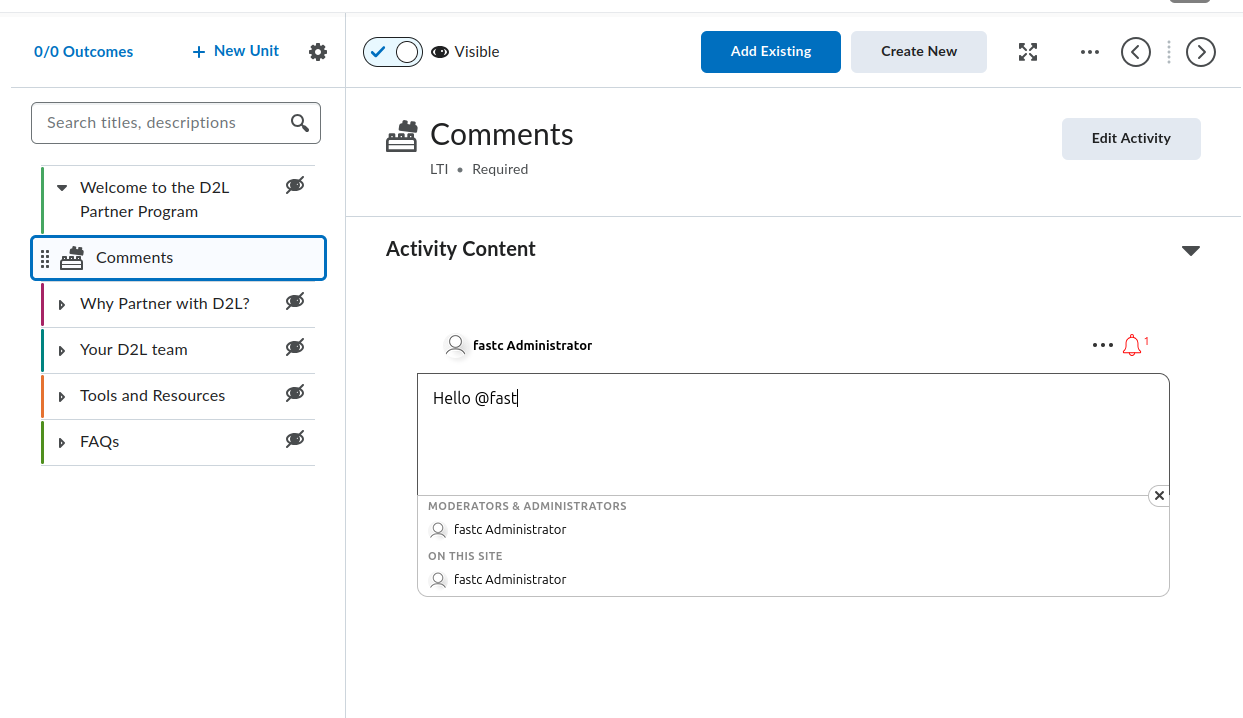
Inside any course unit, the instructor clicks Add Existing, picks FastComments from the activity list, and the tool is placed as a topic in the unit. Renaming the topic, reordering it inside the unit, restricting it to specific groups or release conditions, and toggling visibility all use the standard Brightspace controls. There is no separate FastComments setting screen for instructors to learn.
For inline embedding, the same FastComments tool is also available through the Brightspace HTML editor's Insert Stuff dialog under LTI Advantage. This uses the LTI Deep Linking flow to drop a comment thread directly inside a reading, quiz instructions, or any other HTML topic, so discussion sits next to the content it is about.
Automatic SSO
Students never see a login screen. The LTI 1.3 launch carries the student's Brightspace identity (sub, name, email,
and picture) signed by Brightspace's private key. FastComments verifies the signature against Brightspace's published
JWKS, mints a Secure SSO session for the user, and renders the comment widget. Comments are attributed to the student's
Brightspace account, and instructors moderate using their Brightspace identity too.
Role mapping is automatic. Brightspace Administrator users come through as FastComments admins, Instructor users as moderators, and everyone else as standard commenters. There is no separate user list to maintain on the FastComments side - it follows whatever Brightspace says.
Thread Scoping
Each comment thread is bound to a triple: the Brightspace host, the course, and the resource link. That means two courses that both use a "Reading Reflections" topic each get their own discussion. The same is true if an instructor adds FastComments twice in the same course (for example, once as a unit topic and once as an inline embed inside an HTML page) - each placement is its own thread.
The host portion is part of the thread identifier on purpose. If your institution runs multiple Brightspace instances under one FastComments account, conversations stay isolated to each instance even when course IDs collide.
In Conclusion
If you are running D2L Brightspace, you can be live with FastComments inside an afternoon: generate the URL, paste it into Brightspace, and let instructors drop the tool into their units. For the full step-by-step setup including troubleshooting and per-page screenshots, see the LTI 1.3 Installation Guide. The same integration also covers Moodle, Blackboard, Sakai, Schoology, and any other LTI 1.3 Advantage platform, but Brightspace was our pilot target and the flow is rock-solid there.
Cheers!