

Tue Apr 18 2023
...
April Badges Update
What's New - Badge Stacking
Before yesterday, if you had a set of badges in your community like the following:
- New Commenter (1 comment)
- Community Member (50 comments)
- Expert (500 comments)
... and a user ends up with 500 comments, they’ll see badges displayed on their comments like this:
[New Commenter] [Community Member] [Expert]
In this particular scenario, we probably only want the Expert badge to show. Well, most of our customers want this, but not all. Not all of our tenants have the same setup, and we recognize this.
However, for the communities that follow the above pattern, which is most of them, they want the comments to display the most prestigious badge.
To accommodate this use case, we’ve added the concept of a badge replacing another badge. By doing this, we can create a flow of badges that a user can earn:
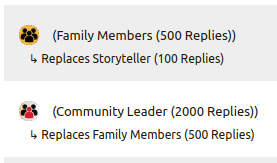
Internally, we call this badge stacking. The new badge "stacks" on top of the old one.
We can configure this by editing a badge and indicating that it replaces another:

Obviously, this can become difficult to track, so the badge list has also been updated to provide more information, including which badge replaces which.
What's New - Reprocessing Improvements
When you make a change to a badge, we have to go through all of your users and determine whether they should still "earn" the badge, and update all displayed badge styles and caches so that the latest version is shown.
Reprocessing no longer removes a badge from a user upon saving, even if they no longer meet the criteria unless the configured criteria changes.
Administrators note - you can decrease the threshold criteria for a badge without reprocessing that removes the badge. Only increasing the threshold will cause reprocessing that may remove the badge in some cases.
For more, read on in The Commenter's Perspective.
The Commenter's Perspective
Reprocessing badges is very risky as users value their badges - and we recognize that! We don’t want to take away a user’s badge because they earned the Reply badge due to 100 users replying to their comments, and then 10 users later delete their comments or get removed by moderators.
The badge should stay, and it does, except...
During reprocessing, we don’t know those previous comments exist, so the badge could be removed from some users if a badge is edited, like if the styling is updated, or if badge stacking is set up.
This is what happened on April 17th, 2023, when we rolled out Badge Stacking and some communities enabled the feature.
Two scenarios were observed:
- Users found that some of their badges appeared to be removed. What actually happened was that all but the most prestigious badges were hidden.
- You can display all of your badges if you want. Simply click the three-dot menu in the top right of your profile and click
Manage Badges.
- You can display all of your badges if you want. Simply click the three-dot menu in the top right of your profile and click
- Some badges did actually get removed for some users, like in the Reply badge example above. To prevent this from happening in the future, we improved the reprocessing system so that the badge will not be removed unless the badge criteria itself changes and you no longer meet the criteria; however, we advise community administrators against doing this because, again, users value their badges.
For Moderators
There’s no change from a moderator’s perspective, except that you will see fewer badges displayed in most cases. You will instead see the most prestigious badges of you and your community members displayed.
Existing Customers
We have completed the rollout of this feature to all existing customers on all tiers! Badge stacking is not enabled by default and must be manually configured.
In Conclusion
We hope you find this new set of features and fixes useful and easy to use.
Cheers!