

Tue Nov 23 2021
...
FastComments Adds Support for #HashTags
What's New
When commenting, users can now enter one or more #hashtags. Clicking on a #hashtag in a comment will take you to a view with other comments that feature the hashtag.
Additionally, #hashtags can be used to link to external pieces of content. With this release, we've launched our HashTag API which allows pre-population of hashtags in your account.
When pre-populating hashtags, we can define a URL for each tag. This means that #hashtags can also link to, for example, a ticket number, or a document in a CRM.
The # symbol can be customized as well, upon request.
How to Use It
When you type # followed by the beginning of a hashtag, a list of search results will appear.
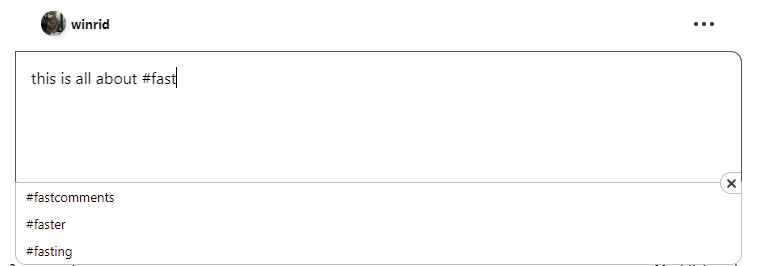
Simply click the hashtag you want to add.
Additionally, you can use the up and down arrow keys to navigate this list, and hit enter to select, or escape to exit.
We understand that you may want to use the # symbol without adding a hashtag. FastComments will detect this and will not interfere with your typing experience.
Adding Hash Tags
If the hashtag you want to use is not in the list of suggestions, FastComments will automatically create the hashtag in the background.
Automatic #hashtag creation can be disabled as per the documentation here.
Who Gets It
All current and new FastComments customers, across all tiers, now have access to #hashtags. #hashtags have been back-ported to earlier versions of the comment widget as well.
How the Autocomplete Works
The tags displayed in the autocompleted list are only from your account. HashTags are not shared across FastComments tenants.
Documentation
There is specific documentation for #hashtags. See here: https://docs.fastcomments.com/guide-hashtags.html
In Conclusion
Like the rest of FastComments, we hope that you find this feature fast and easy to use.
Cheers!