

Thu Nov 19 2020
...
Protecting Comment Threads With Single-Sign-On
! This Article Contains Technical Jargon
Introduction
FastComments SSO (details here) offers your users a way to comment without needing to log in to another platform.
However, by itself, this does not secure your comment threads, as comment data is publicly available by default - anyone who can view the page can see the comments. This release changes that.
No-Code Setup
We can stop viewing and interacting with our comment threads once SSO is set up, by creating a customization rule.
When you do this, search for SSO, and you will find this option:
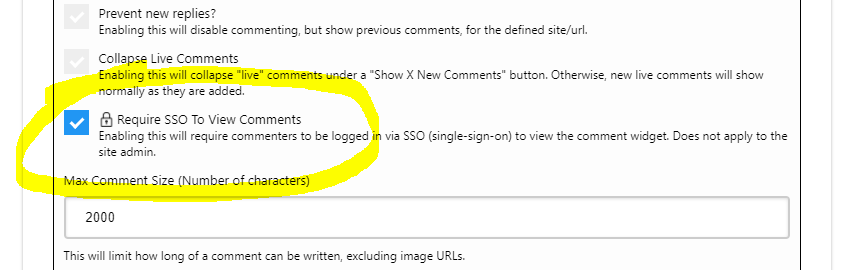
Enable it and save the customization rule.
Only Protect a Certain Domain or Page
To protect only a specific Domain or Page, we will simply configure the customization rule accordingly.
At the top of the customization UI, you'll see two inputs, Domain and URL ID.
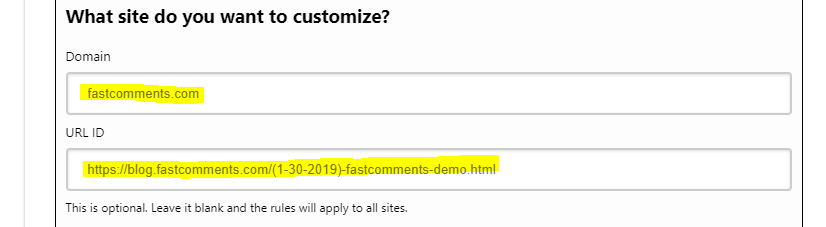
To protect a particular domain, enter the domain in the "domain" field.
To protect a specific page, enter a page URL in the "URL ID" field. If you have a custom integration with FastComments, you may enter a type of ID here instead of a URL.
Protection Beyond Reading
Enabling this option will prevent commenting on the page or domain unless the user is logged in via SSO.
Gotchas
Users who created comments prior to your SSO integration will not be able to see them unless they log in through your SSO integration.
In Conclusion
We hope you found this guide useful and easy to read. Feel free to comment below with any questions.
Cheers!