

Mon Oct 11 2021
...
FastComments Gets @mentions
What's New
Previously, FastComments would notify users if you replied to their comments, but there was no way to tag multiple people in a single comment. Additionally, these notifications were sent in batches every hour. With @mentions, it's now possible to tag one or more users, and FastComments will notify them immediately via email.
How to Use It
When you type @, followed by the beginning of a user's name, a list of search results will appear.
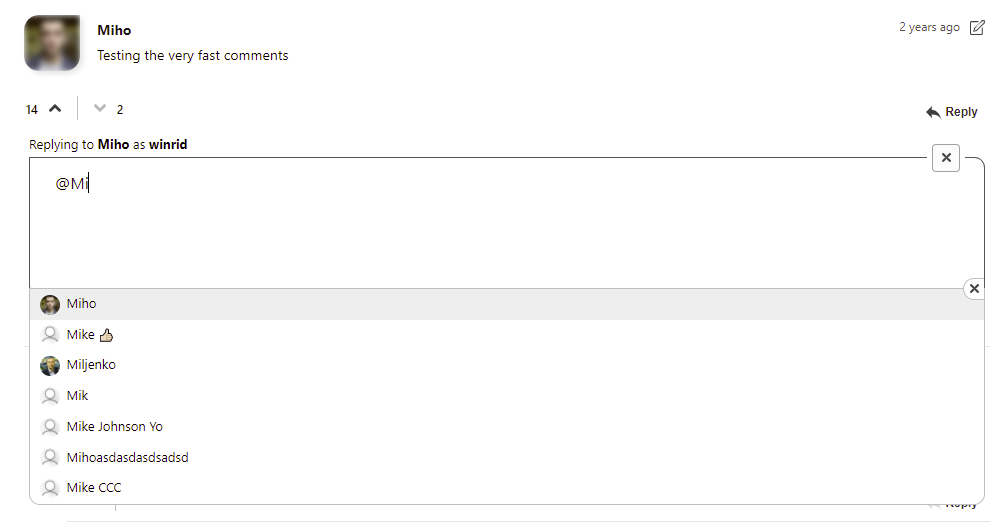
Just click the name of the user you wish to tag.
You can also use the up and down arrow keys to navigate this list and hit enter to select, or escape to exit.
We understand that you may want to use the @ symbol without tagging a user. FastComments will recognize this and will not interfere with your typing experience.
Who Gets It
All current and new FastComments customers, across all tiers, now have access to @mentions. @mentions have also been back-ported to earlier versions of the comment widget.
How the Autocomplete Works
The users displayed in the autocompleted list are determined by:
- Users who have commented on the same page or thread.
- Users who have created their FastComments accounts through the same site.
- Moderators of the current site.
- SSO users that belong to the current tenant.
Editing Comments
Mentions can be added to existing comments by editing them. However, the Moderate Comments application does not currently autocomplete @mentions.
Future Considerations
In the future, users who have FastComments open in a browser window will get a notification when they are mentioned, if they have opted into notifications.
In Conclusion
Like the rest of FastComments, we hope that you find this feature fast and easy to use.
Cheers!