

How to create a comment system like Hackaday.com
Jan 24th 2020
WHOA WHAT HAPPENED?
This post serves as a demonstration of using FastComments to create a comment system that resembles https://hackaday.com.
We don't recommend copying them. However, this showcases the flexibility of FastComments.
Making FastComments appear this way is straightforward! We developed a UI for it! For instance, here is the configuration we used to align FastComments with this page:
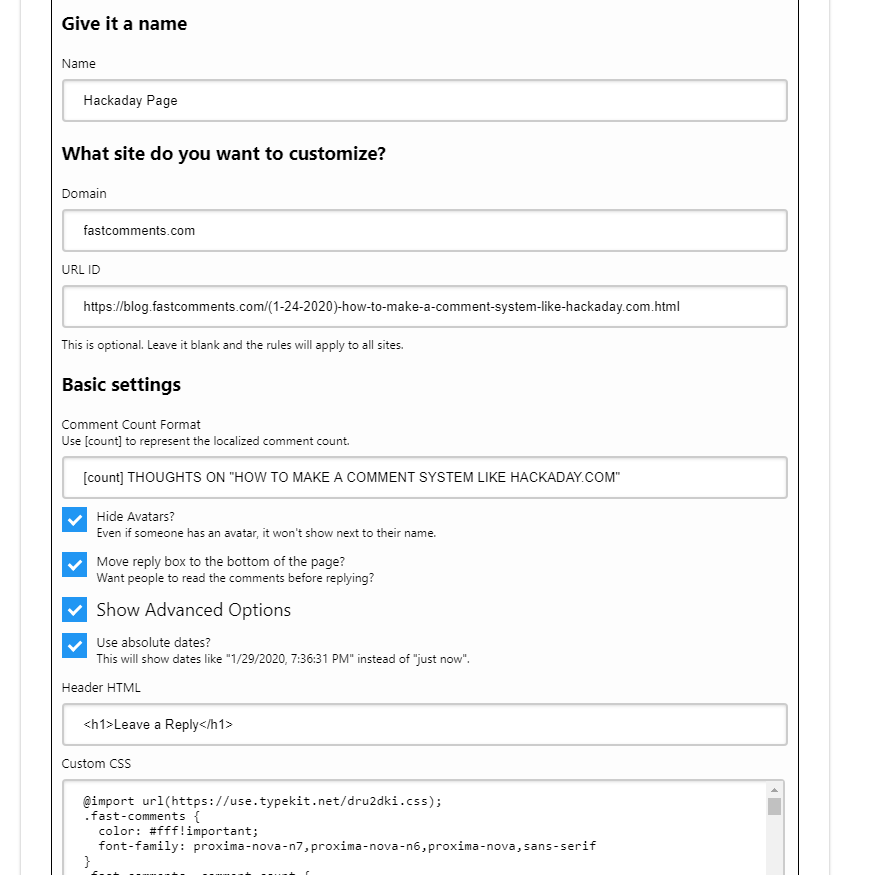
If you prefer to do it via code, it’s just as simple.
We just need to set a few options. Well, seven. Here's the code snippet (custom CSS omitted). Only a limited amount of CSS can be inserted this way. We recommend using the UI above for defining CSS. It will also minify it for you, whereas defining the customCSS property will not apply any minification optimizations.
What do each of these mean?
- commentCountFormat = The title format above the comment thread. "[count]" is replaced with the actual localized count.
- commentCountUpdated = A function that triggers when the comment count changes. We use this to update the comment count at the top of the page.
- headerHTML = HTML displayed above the "leave a reply" box. In this case, we use it to insert a heading.
- hideAvatars = Hackaday does not use avatars; hence we set this to true to hide them.
- inputAfterComments = Moves the reply box to the bottom of the comment feed.
- absoluteDates = Changes the default date format (e.g., "11 Minutes Ago") to a fixed date.
- customCSS = Custom styling.
All configuration options are documented here.