

Tue Jan 11 2022
...
Introducing The Gif Picker
What's New
To kick off the new year, conversations have become more enjoyable with animated reactions via the Gif Picker.
How to Use It
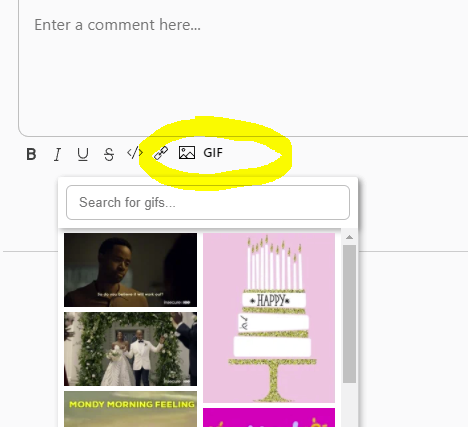
If image uploads are enabled, a GIF icon will show up in the comment toolbar.
Clicking this will display a list of trending gifs. This list preloads a certain number of images and allows for infinite scrolling.
Gif Providers
Currently, the only integration that FastComments supports is with Giphy.
Gif Anonymization
We understand that a significant portion of our user base chooses FastComments due to privacy reasons.
All assets and API calls from Giphy are devoid of information such as cookies and your users' IP address.
Gif Content Rating
The content rating of gifs can be adjusted to range from PG to R-rated based on your audience. Documentation for customizing the content rating is here.
Documentation
There is specific documentation for the gif picker. See here: https://docs.fastcomments.com/guide-gifs.html
In Conclusion
We've made a significant investment to ensure that the Gif picker and its related functionality are fast and do not slow down the rest of the product.
Like the rest of FastComments, we hope that you find this feature fast, fun, and user-friendly.
Cheers!